
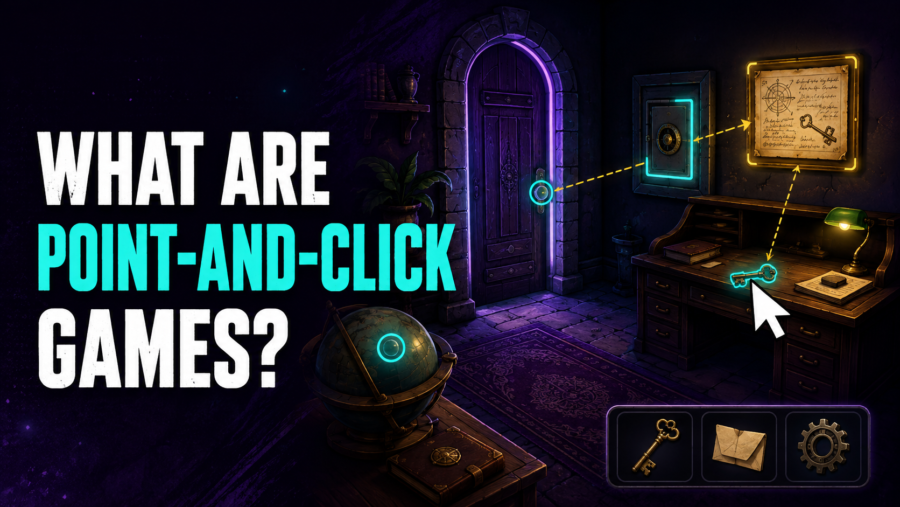
Point-and-click games are games in which players use a pointer to move through scenes, inspect objects, talk to characters, collect items, and solve problems. The label usually refers to an interface and a style of adventure or puzzle design, not simply to any game that accepts mouse clicks.
A typical point-and-click game asks the player to observe a scene, identify an interactive area, choose an action, and interpret the result. Progress often depends more on attention and reasoning than on fast reactions.
What “Point and Click” Actually Describes
The phrase describes a direct input loop:
- Move a cursor or pointer to part of the scene.
- Select an object, location, character, or interface control.
- Let the game interpret the click as movement or an action.
On a touchscreen, a tap can replace the physical mouse click. The game can still use point-and-click design even when no mouse is connected.
The important feature is that the player selects meaningful targets in the scene. A game does not become a point-and-click adventure merely because its menu has clickable buttons.
The Main Point-and-Click Mechanics
Different games simplify or expand the interface, but several mechanics appear frequently.
Hotspots
A hotspot is an interactive area attached to an object, character, doorway, or part of the background. Clicking it may reveal a description, begin a conversation, collect an item, change locations, or trigger a puzzle response.
Hotspots can be visible, highlighted on request, or hidden until the cursor passes over them. Clear hotspot feedback reduces the need to sweep every pixel of the screen in search of an unmarked object.
Context-Sensitive Actions
In a context-sensitive interface, the game chooses an appropriate action for the selected target. Clicking a doorway may move the character, clicking a person may begin dialogue, and clicking a loose object may pick it up.
This approach keeps the control scheme compact. The tradeoff is that the player has less direct control over which verb is used.
Verb Interfaces
Some point-and-click games let the player choose an action such as look, use, open, take, move, or talk. The player selects a verb and then an object.
Verb systems can support more detailed interaction and playful responses. They also add interface steps and can create many combinations that do not advance the puzzle.
Inventory
Collected items are commonly stored in an inventory. The player may use an item on an object in the scene, give it to a character, examine it, or combine it with another item.
Inventory puzzles work best when the relationship between the item, the problem, and the result can be understood from clues. An unexpected solution can still feel fair if the game establishes the necessary logic beforehand.
Dialogue
Conversation can deliver information, reveal character motives, offer choices, or provide a clue. Some games let the player select dialogue topics, while others move through a fixed exchange after a click.
Dialogue is not required for point-and-click play. A game can tell its story through objects, signs, animation, and environmental changes instead.
A Typical Point-and-Click Gameplay Loop
The basic loop is usually investigative:
- Enter or reveal a scene.
- Examine objects and characters.
- Collect information or usable items.
- Identify the obstacle that blocks progress.
- Connect a clue, dialogue detail, or inventory item to that obstacle.
- Apply the solution and open a new path.
The challenge often comes from understanding relationships. A locked route may require a key, but it could instead require persuading a character, repairing a mechanism, arranging symbols, or discovering why the route is blocked.
Point-and-Click Games vs Clicker Games
The names sound similar, but the mechanics are different.
A point-and-click game uses clicks to choose targets and actions within a scene. A clicker game uses repeated input to generate a resource or accelerate a growth system. Many clicker games later add automation so progress no longer depends on constant input.
Incremental, clicker, and idle games explains that progression loop in detail.
Point-and-Click Games vs Hidden-Object Games
Hidden-object games ask players to locate specific items in a detailed image. That search can appear inside a larger point-and-click adventure, but the two labels are not interchangeable.
A point-and-click adventure usually connects observation to navigation, dialogue, inventory, and multi-step puzzles. A hidden-object scene can be a self-contained visual search without those systems.
Point-and-Click Games vs Visual Novels
Visual novels usually emphasize reading, character interaction, and narrative choices. Some use a pointer and clickable choices, but their central loop may not involve exploring scenes or manipulating objects.
The genres can overlap. A story-focused game may combine dialogue choices with hotspots, item use, or environmental puzzles. Genre labels describe dominant mechanics, not rigid boundaries.
Point-and-Click Games vs Platformers
Platformers focus on controlling movement through space, often through running, jumping, climbing, or avoiding hazards. Timing and positioning are usually central.
Point-and-click games normally abstract that movement. The player selects a destination and the character travels there automatically, or the view changes directly to another scene.
A hybrid can use both structures, but they ask for different skills. Platformer game mechanics explains why direct movement and traversal matter to that genre.
What Makes a Point-and-Click Puzzle Fair?
A fair puzzle does not have to be obvious. It should provide enough information for the player to form and test a reasonable idea.
Useful design signals include:
- A clear statement or visual indication of the obstacle
- Consistent rules for how objects can be used
- Dialogue or environmental clues that point toward the relationship
- Feedback that explains why an attempted action failed
- A limited number of relevant items or targets
- A way to revisit important information
Poor feedback can make a logical puzzle feel arbitrary. If every incorrect action produces the same vague response, the player cannot learn from an attempt.
What Is Pixel Hunting?
Pixel hunting is the frustrating search for a small or poorly marked hotspot. The player may understand what kind of item is needed but fail to find the few pixels that the interface recognizes.
Modern interfaces can reduce this problem with:
- Hotspot highlighting
- Cursor changes
- Larger interactive areas
- Strong visual contrast
- Labels that appear on hover or focus
- A hint system that identifies the relevant scene
These features do not solve the puzzle for the player. They clarify what can be interacted with so the challenge remains in reasoning rather than cursor scanning.
How Touchscreens Change Point-and-Click Controls
A tap can replace a click, but touch introduces different design needs. There is no permanent cursor to reveal a hotspot before selection, and a finger covers more of the screen than a mouse pointer.
Touch-friendly design therefore benefits from larger targets, readable labels, clear selection states, and enough spacing between nearby objects. A long press can provide an examine action, but only if the interface teaches that behavior.
Not every mouse-based point-and-click game automatically works well with touch. The layout and input areas must be designed or adapted for the device.
Why Point-and-Click Games Often Feel Deliberate
Most point-and-click puzzles allow time to examine the scene and consider options. The pace comes from information gathering and problem solving rather than constant real-time pressure.
That deliberate structure is not the same as turn-based play. A turn-based strategy game divides actions into formal turns. A point-and-click game can run continuously while still allowing the player to pause and think.
Timed scenes, quick decisions, and action sequences can appear, but they are additions rather than requirements of the interface.
Common Accessibility and Usability Features
Helpful options can include:
- Hotspot highlighting
- Text captions and dialogue history
- Adjustable text speed
- High-contrast cursor options
- Keyboard navigation for interface elements
- Separate music, voice, and effects volume
- Hints with more than one level of detail
- The ability to skip repeated walking animations
No single feature is guaranteed across the genre. Players should check the exact game’s settings and controls rather than assume that every point-and-click interface behaves the same way.
Frequently Asked Questions
Are point-and-click games always adventure games?
No. The interface can support puzzle, mystery, educational, escape-room, and other designs. It is most closely associated with adventure games, but it is not limited to them.
Do point-and-click games require a mouse?
No. A trackpad, touchscreen, keyboard-controlled pointer, or another pointing device can provide the same selection loop if the game supports it.
Is every mouse-controlled game point-and-click?
No. Strategy, action, drawing, card, and management games can all use a mouse. Point-and-click usually implies scene-based interaction, exploration, and puzzle or adventure conventions.
What is a hotspot?
A hotspot is an interactive region connected to an object, character, exit, or environmental detail. Selecting it produces an action or response.
Are point-and-click games single-player?
They are often designed for one active player, but the interface does not require that mode. The difference between single-player, co-op, and multiplayer is explained in the game modes guide.